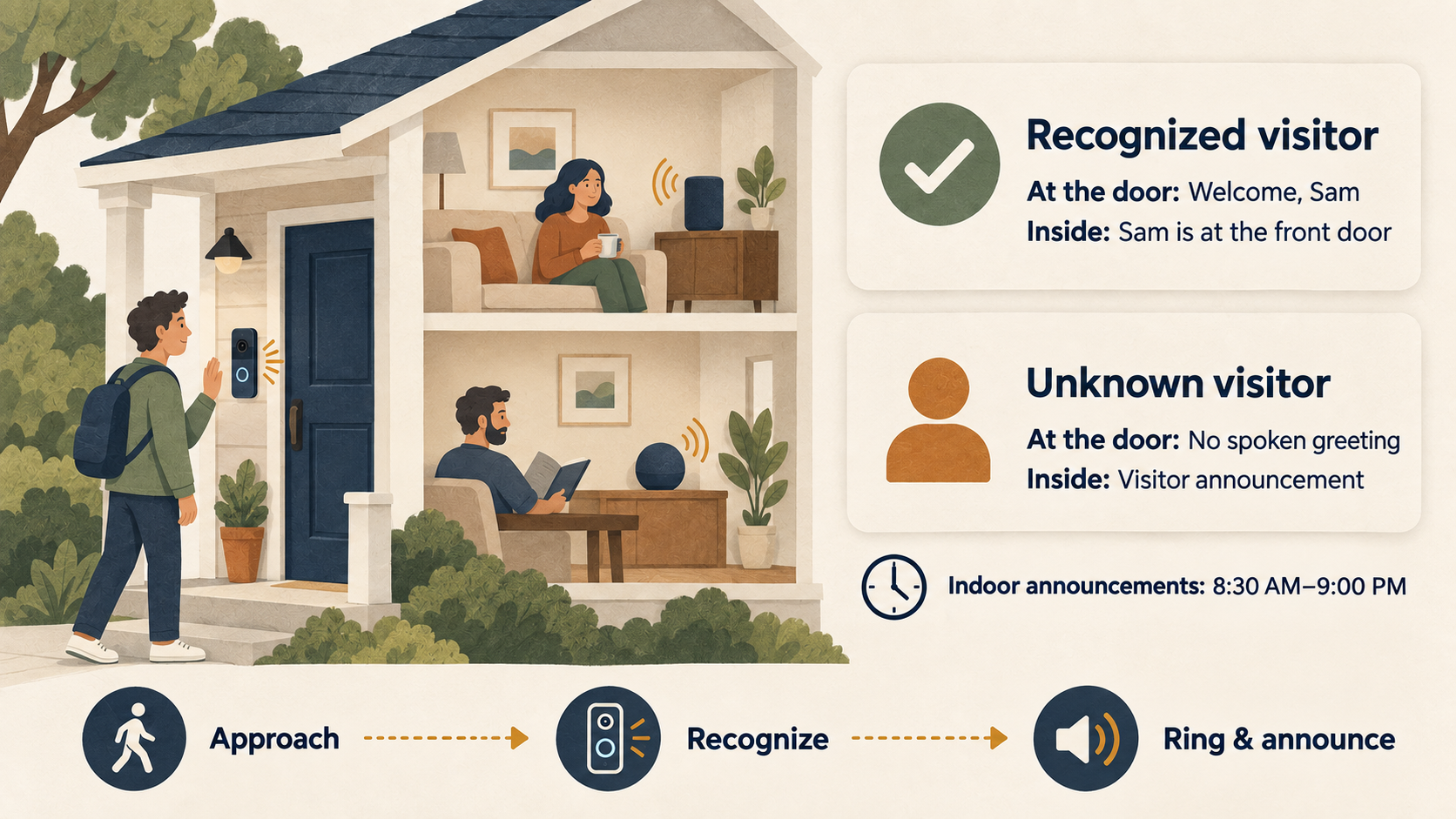
A Familiar Voice at the Front Door
When someone presses the front doorbell, it can now greet a recognized visitor by name: “Welcome, Sam.” Inside the house, the Sonos speakers and HomePods announce, “Sam Carter is at the front door.” An unrecognized visitor receives no spoken greeting from the doorbell; the household receives a neutral announcement during the configured waking hours. The reference faces come from our family photo library, where Immich already maintains the names and photographs needed for enrollment.
Immich supplies the photos, CompreFace recognizes visitors, and Home Assistant controls the greetings. The deployment manifests live in the face-recognition directory of my RKE2 repository. This article explains the architecture and the decisions that shaped it; the full tutorial provides the deployment examples, training script, greeting clips, and Home Assistant configuration.
You can run the same recognition workflow on a Docker host without Kubernetes. CompreFace provides a Docker Compose file and matching .env settings, and Double Take provides its own Compose example. The Docker section of the tutorial explains storage, networking, and the endpoint changes needed to use those deployments with the Home Assistant automations.
From Photograph to Spoken Announcement
Immich supplies the reference images. Over several years, I have accumulated labeled photographs of family members and regular visitors, often across different ages, angles, and lighting conditions. Recognition depends on those labels being correct and the photographs showing usable faces.
CompreFace performs the recognition. This self-hosted service from Exadel exposes a REST API through which faces can be enrolled under a subject name and subsequent images compared with those references. I use the arcface-r100 CPU build on an amd64 node. The CUDA 11 GPU builds I evaluated were unsuitable for the arm64 Spark and NVIDIA GeForce RTX 5090 (Blackwell) nodes in this deployment; CPU inference proved adequate for the doorbell’s request volume.
Double Take handles recognition requests between Home Assistant and CompreFace. Its /api/recognize endpoint accepts a snapshot URL, retrieves the image, submits it for recognition, and applies the configured confidence and minimum-area thresholds. Its saved matches and thumbnails let me inspect incorrect results and identify problems in the reference images.
Home Assistant coordinates the sequence through the UniFi Protect integration. The G4 Doorbell Pro supplies a camera image, person-detection state, a ring event, and a speaker entity. One automation attempts recognition while the visitor approaches; a second responds to the ring and decides which announcements to play.
Sonos and HomePods deliver the household announcement. On supported Sonos hardware, the announcement overlay temporarily lowers the music volume and restores it after the message. The HomePods receive the announcement through the configured text-to-speech (TTS) path. Household announcements are restricted to 08:30–21:00; the doorbell’s personalized greeting has no time restriction.
Building the Reference Set from Immich
The photo library offers a broader range of reference images than I could conveniently collect during a brief enrollment session at the door. A Python script retrieves Immich’s named people and their associated assets, obtains the face bounding boxes, and crops the corresponding preview images with additional padding. It then submits each crop to CompreFace under a short subject key. A name map, for example, translates “Samuel James Carter” into sam, which also becomes the greeting filename and the Home Assistant lookup key.
My initial run enrolled twenty-two people with approximately forty samples each, yielding about 850 face embeddings. The number of usable samples depends on the photographs available.
Direct submission to CompreFace resolved a problem encountered during bulk enrollment through Double Take. In my tests, several hundred images submitted through Double Take’s /api/train endpoint stalled its Node event loop long enough to fail Kubernetes liveness checks. Sending the batch to CompreFace avoided that failure, while Double Take remained useful for reviewing and enrolling individual doorbell captures.
Completing Recognition Before the Ring
At ring time, a face in this camera’s image is often only about a hundred pixels across. Correct matches in my tests produced ArcFace similarity scores around 0.6–0.7, which led me to configure Double Take’s match threshold at 60. That threshold can also accept false matches. Test it with both familiar and unfamiliar visitors before using it with another camera.
The first implementation captured and recognized the image after the ring, leaving a delay of two to three seconds before the greeting. Recognition during the approach removes that work from the usual ring sequence. When Protect’s person-detection sensor changes to on, the first automation captures a frame and makes up to three recognition attempts when no face is detected. A qualifying match updates two helpers containing the subject name and timestamp.
The ring automation accepts a cached name less than sixty seconds old. Otherwise, it captures a fresh image and requests recognition. That cache improves responsiveness, but it has a specific limitation: it records the most recent successful match without confirming that the same person pressed the button. An unsuccessful recognition attempt leaves the previous name in place until it expires.
Each doorbell greeting is a pre-rendered MP3. During testing, UniFi’s talkback startup clipped the beginning of the spoken message; adding 1.5 seconds of leading silence preserved the opening, and loudness normalization made the clips more consistent. The doorbell playback and household announcement start in parallel. Sequential execution had delayed the Sonos announcement by almost two seconds, although parallel dispatch still cannot guarantee synchronized playback across different devices.
Diagnosing the Delays and Failed Announcements
The largest initial delay arose in the Home Assistant virtual machine. With 2 vCPU and 2 GB of memory, the Whisper add-on repeatedly exhausted its available memory and restarted approximately every seven seconds. The complete doorbell sequence took twelve seconds. After increasing the VM to 4 vCPU and 8 GB, I measured approximately 2.6 seconds to capture the snapshot and recognize the face.
I initially suspected that CompreFace took longer to respond after sitting idle. A controlled test with the periodic warming request disabled showed no additional delay over the tested intervals. The separate warmer deployment now submits a request every two minutes as a health check.
Concurrent requests exposed another constraint in this CompreFace build. With more than one uWSGI thread per worker, I encountered RetinaFace/MXNet shape mismatches and HTTP 500 responses. The configuration uses one thread per worker and scales through separate processes. Memory consumption also required attention: three workers were killed at a 14 GiB limit, leading to the present configuration of two workers with a 20 GiB limit.
The announcement script required a separate repair. An older grouping sequence called sonos.join and sonos.unjoin, which were unavailable in the Home Assistant 2026.9 installation where I encountered the failure. The current media-player grouping actions are media_player.join and media_player.unjoin; the replacement announcement script uses the Sonos overlay and requires no grouping sequence. This also addressed the interrupted AirPlay and Spotify Connect playback I had observed with the earlier restore procedure.
Giving Unknown Visitors a Description
For an unrecognized face, the extended early-recognition automation also submits the frame to LLM Vision, using a local qwen2.5vl model on Ollama. It caches a brief description that the ring announcement can use when sufficiently recent: “A delivery driver with a package is at the front door,” for example. Such descriptions are model inferences and may misidentify clothing, objects, or a visitor’s role.
Generating a description takes additional time. A cold model may take longer to load than the interval between approach and ring, and competing workloads can affect whether it remains resident. The tutorial discusses the timeouts and caching involved, alongside the simpler configuration that retains the generic unknown-person announcement.
What the Doorbell Now Does
The core workflow consists of two recognition services, an initial enrollment script, a set of greeting clips, and two Home Assistant automations. When a recent match is available, the ring sequence proceeds directly to playback; the remaining audible delay includes the talkback startup and the clip’s leading silence. A mistaken match can still produce the wrong greeting and announcement.
The tutorial explains this configuration step by step, including the deployment, CompreFace provisioning, Immich enrollment, audio preparation, and automation logic. It also describes the storage and access implications of retaining face references and doorbell snapshots.